



If you’re new to Taobao, one of the first questions you’ll probably ask is: How do I change Taobao to English?
Taobao is one of the largest online shopping platforms in the world, but it’s primarily designed for Chinese users. This means the menus, and product descriptions are mostly in Chinese.
But overseas users can still browse and shop on Taobao effectively. In this guide, you’ll learn whether Taobao has an English version, and the best practical ways to use Taobao in English.
Does Taobao Have an Official English Version?
Taobao does not currently offer a full official English version of its platform. Unlike AliExpress, which is built specifically for international users, Taobao focuses on the domestic Chinese market. This means there is no built-in language switch that converts the entire site into English.
However, this does not mean international users cannot use Taobao in English. With the right tools and methods, Taobao can still be navigated effectively by non-Chinese speakers.
Can You Change Taobao to English?
While Taobao does not provide a native English interface, you can still view and use Taobao in English through several practical methods:
- Browser translation tools
- Mobile browser translation
- Partial English support inside the Taobao app
- Taobao shopping agents
Each method offers a different balance between accuracy, convenience, and usability.
How to Change Taobao to English?Step-by-Step Guide
Although Taobao does not offer an official English interface, overseas users are not locked out by the language barrier. With the right setup, Taobao can be browsed, searched, and used efficiently in English across different devices.
The following sections walk through the most practical approaches to viewing Taobao in English, from direct translation tools to fully assisted solutions.
Method 1: Using Desktop Browsers
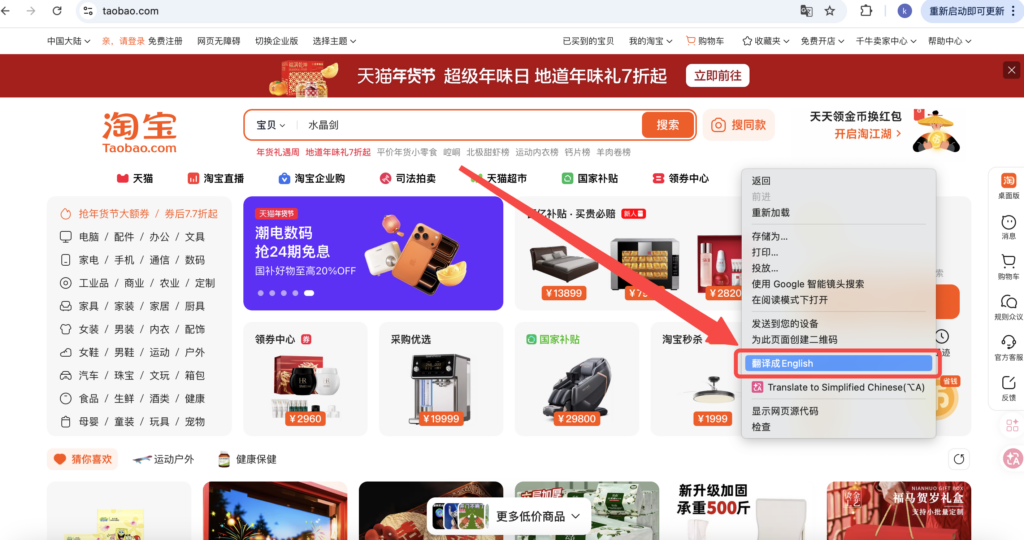
Desktop browsers are currently the most stable and practical way to use Taobao in English. Below are the steps for using built-in browser translation in Chrome or Microsoft Edge:
- Open www.taobao.com,
- Right-click anywhere on the page,
- Select “Translate to English”, the page will automatically reload and display content in English.
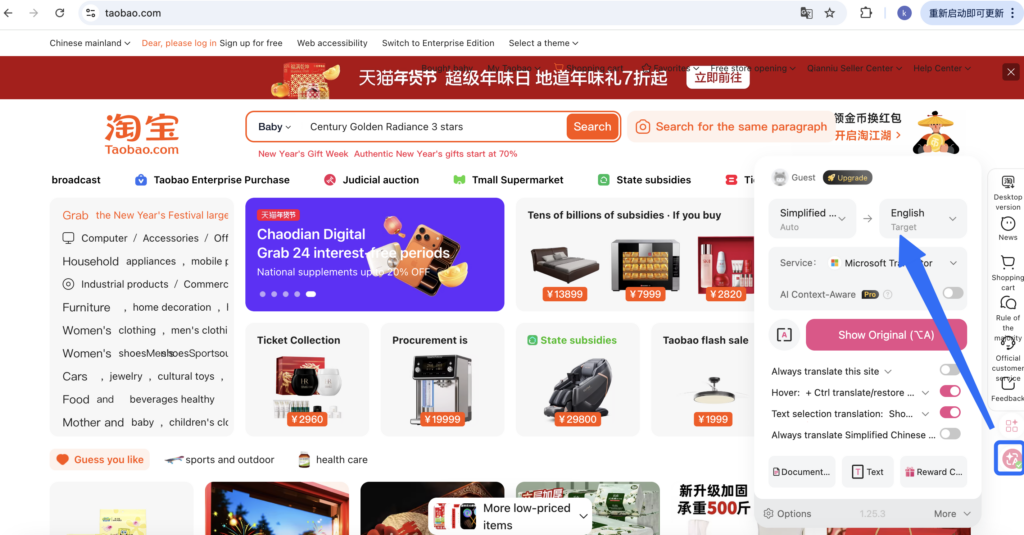
This method translates navigation menus, product titles, prices, and most product descriptions. For an even smoother experience, you can combine the browser’s built-in translation with a Google Translate extension.
Method 2: Using Mobile Browsers
If you prefer not to install the Taobao app, using a mobile browser is still a viable option. You can rely on the built-in translation features in Safari or Chrome to view Taobao in English.
- Safari (iPhone): Tap the “aA” icon in the address bar and select “Translate to English.”
- Chrome (iOS / Android): Chrome will automatically prompt you to translate the page—simply choose English.
This method works well for browsing products and basic navigation. However, translation accuracy may decrease when dealing with complex pop-ups or interactive elements.
Method 3:Using the Taobao App
The Taobao app does not offer a full English interface. However, by adjusting certain settings, you can enable limited English support in some sections of the app. Steps:
- Open the Taobao app and go to “My Taobao”
- Tap the Settings icon in the top-right corner
- Under Account & Security, select Country / Region
- Switch to your current country or an English-speaking region
- Save the changes and allow the page to refresh
- Return to My Taobao → Settings → Account & Security
- Tap Language and switch it to English
This method works directly within the Taobao app and requires no external tools. Some system-level pages will appear in English. But most product listings, seller pages, and core features remain in Chinese, offering only partial English support.
Method 4: Using Taobao Shopping Agents
If you wish to enjoy a fully English, barrier-free shopping experience, opting for a professional Taobao shopping agent service is the most convenient and efficient solution.

Typically, Taobao shopping agent services include: an all-English interface and communication, one-stop purchasing assistance, quality checks, international shipping and package consolidation, as well as personalized services.
This option is ideal for first-time Taobao users unfamiliar with Chinese procedures, as well as consumers who want to save time and avoid handling translation on their own.
Conclusion
Taobao does not offer a full official English version, but that doesn’t mean users can’t use it effectively. With browser translation tools, mobile translation, limited in-app English settings, or professional shopping agents, Taobao can be accessed in English with varying levels of convenience.
The best method depends on your language ability, shopping frequency, and need for support. Choose the approach that balances accuracy, ease of use, and overall shopping experience.
FAQs
Even when using Taobao’s English interface or browser translation tools, product prices are usually displayed in Renminbi (RMB) and are not automatically converted to US dollars. It is recommended to use a currency converter to estimate the total cost. However, if you switch the currency unit within the Taobao app, prices may be displayed in the selected currency.
Taobao does not offer a full English version, so some pages—such as product listings, seller chats, or pop-up windows—remain in Chinese. This is normal and does not indicate an error with your settings.
No. Changing language settings or using translation tools will not affect your shopping cart, saved items, or previous orders. All account data remains unchanged.