



Xianyu has become a popular place to discover affordable items, unique finds, and second-hand products that are often difficult to locate on traditional shopping platforms. However, because the platform is mainly designed for Chinese users, navigating the interface and completing purchases may feel unfamiliar at first.
If you’re exploring how to buy things on Xianyu, understanding the overall process can make your shopping experience smoother and more comfortable from start to finish.
Is It Possible to Buy Directly from Xianyu?
Yes — but unlike Taobao, buying on Xianyu is usually not straightforward and often cannot be done directly, especially if you are outside China. Since most Xianyu sellers are individuals, they typically ship only within China and rarely support international delivery or overseas payments. Each transaction depends on the seller, so there is no standard purchasing process. Many buyers therefore rely on an intermediary or forwarding service to complete the order.
What Do You Need Before Buying on Xianyu?
To make your Xianyu shopping easier, prepare the following essentials:
- A Xianyu or Taobao account (usually linked to Alipay)
- A payment method: Alipay (linked to an international card), WeChat Pay, or Apple Pay
- A translation tool, since Xianyu does not have an English interface
- A Chinese shipping address (from a forwarding service or agent)
How to Buy Things on Xianyu? Step-by-Step Guide
At first glance, Xianyu may seem difficult to use, especially if you are unfamiliar with Chinese platforms. However, once you understand the general flow, the process becomes much more manageable. The key is to follow the correct steps and ensure all necessary information is prepared before placing an order.
Method 1: Buy via the Xianyu App
Using the Xianyu app is one of the most direct ways to shop. It offers access to all the platform’s features and allows you to browse products, contact sellers, and make payments easily.
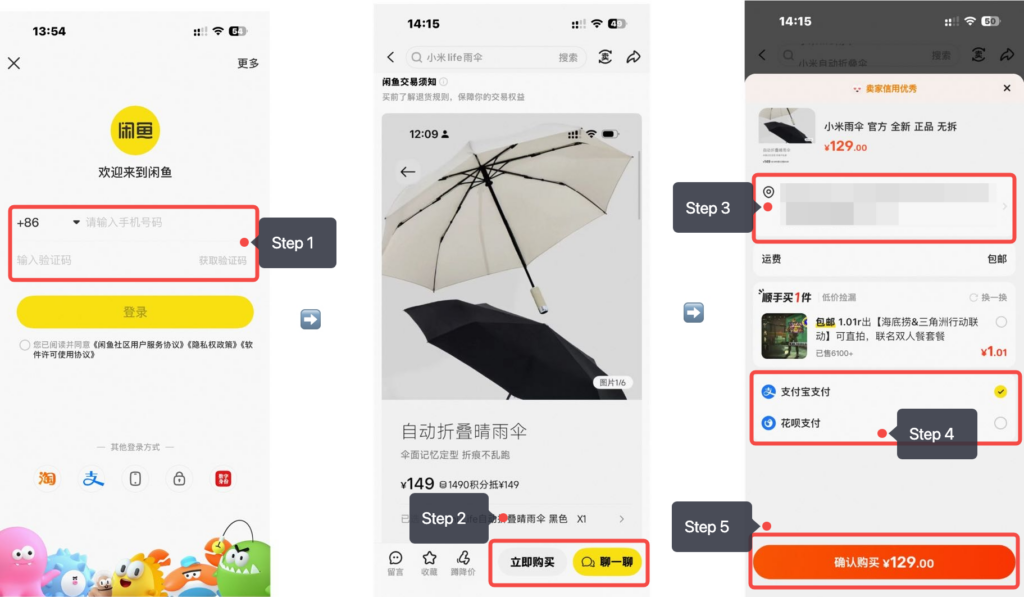
Step 1: Download & Log In
Download the Xianyu app from the App Store or Google Play. Log in using a mobile number that can receive verification codes, or a Taobao or Alipay account.
Step 2: Find Forwarding Service
Most Xianyu sellers ship only within China and do not offer international delivery. If you are outside China, you will need to find a third-party forwarding service in advance. The forwarding service provides a warehouse address in China and then arranges international shipping for you.
Step 3: Select Items
Browse items, select options, and proceed to checkout after confirming details with the seller if needed.
Step 4: Enter Address
Enter a China shipping address, usually provided by your forwarding or purchasing service. Make sure the address is complete and accurate to ensure the seller can deliver the items to the warehouse without issues.
Step 5: Complete Payment
Choose an available payment method and complete the payment.
If you have WeChat, you can use the Xianyu Mini Program for easier login and payment. However, since there is no English version, you’ll still need to use translation tools (copy text or screenshots).
Method 2: Buy Through a Xianyu Purchasing Service

Since most Xianyu sellers are individual users who ship only within China, completing an order on your own can be complicated. A purchasing service helps bridge this gap by handling communication, payment, and delivery for you. Below is a typical process using Mulebuy as an example:
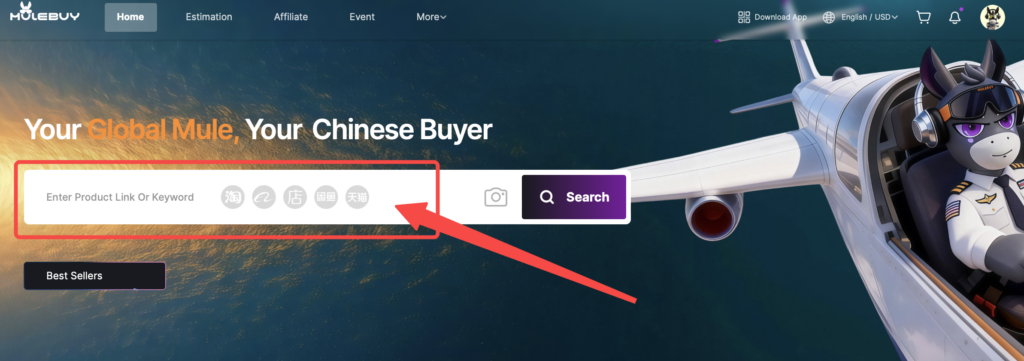
Step 1: Paste Link into Mulebuy
Find the item on Xianyu and copy the product link.
Step 2: Select Specs & Pay
Choose the appropriate product specifications and complete the payment for the item.
Step 3: Quality Check
Wait for the item to arrive at Mulebuy’s warehouse in China. Mulebuy will perform a quality check and take photos of the product.
Step 4: Submit International Shipping
After confirming the item is correct, submit the package for international shipping and wait for delivery.
Conclusion
Compared to regular e-commerce platforms, Xianyu does have a bit of a learning curve. However, once you understand how to buy things on Xianyu and choose the ordering method that works best for you, completing a purchase becomes straightforward.
With these key points in mind, you’ll be able to navigate Xianyu more efficiently and explore a wide range of unique and affordable products with greater ease.
FAQs
You can use Alipay as the main payment method, which can be linked to an international bank card. If you use the Xianyu WeChat Mini Program, you can also pay directly with WeChat Pay.
Yes, you can use a non-Chinese phone number, as long as it can receive SMS verification codes. This is required for both registration and login. Keep in mind that some features, like linking Alipay or verifying your account, may still require additional information or a Chinese-based account.
Direct payment on Xianyu usually does not support international credit cards and mainly requires Alipay or WeChat Pay. However, some international credit cards can be linked to Alipay, allowing you to complete payments through your Alipay account.