



Taobao is one of the largest online marketplaces in the world, offering everything from affordable fashion and electronics to niche collectibles and wholesale products. If you want to shop directly from Chinese sellers, the first step is creating an account on Taobao. However, many users do not know how to make a Taobao account.
This guide explains how to register for Taobao if you’re based outside China, including the requirements, detailed app and website steps, and a simpler alternative if you’d rather avoid the hassle.
Can You Create a Taobao Account?
Yes, anyone can register a Taobao account, whether you’re in China or any other country. You do not need to be a Chinese citizen. If you are located outside China, registration is still possible — you just need a valid mobile number that can receive SMS messages. Taobao supports international phone numbers for registration.
But a few things to keep in mind though: the whole interface is in Chinese, you’ll need to verify with an SMS (which might be delayed depending on your carrier), and you have to link it to Alipay to pay for things.

What You Need Before You Register?
Before creating your Taobao account, prepare the following:
- Mobile Phone Number: You’ll need a working mobile number and make sure it can receive SMS messages for verification.
- A Strong Password: Choose a secure password that is 8–20 characters long.
- Stable Internet Connection: Use a stable network and avoid frequently switching VPNs or IP addresses, as this may trigger security checks.
- An Alipay Account (Optional): While not required for registration, having an Alipay account will make future payments on Taobao much smoother.
With everything prepared, the registration process should go smoothly.
How to Make a Taobao Account? Step-by-Step Guide
Creating an account on Taobao is quick and beginner-friendly. Whether you prefer registering on your mobile device or through a desktop browser, the process only takes a few minutes and requires a valid phone number for verification.
Below, we’ll walk you through both methods so you can choose the one that’s most convenient for you.
Method 1: Using the Taobao Website
The Taobao website is the easier option for overseas users. Unlike the app, it works seamlessly with browser translation tools, making the Chinese interface simple to navigate.
Step 1: Enable Browser Translation
Right-click anywhere on the Taobao page and select “Translate to English” (Chrome), or enable the translation feature in your browser settings. This will automatically change Taobao to English so the registration steps are much easier to follow.
Step 2: Visit the Taobao Homepage
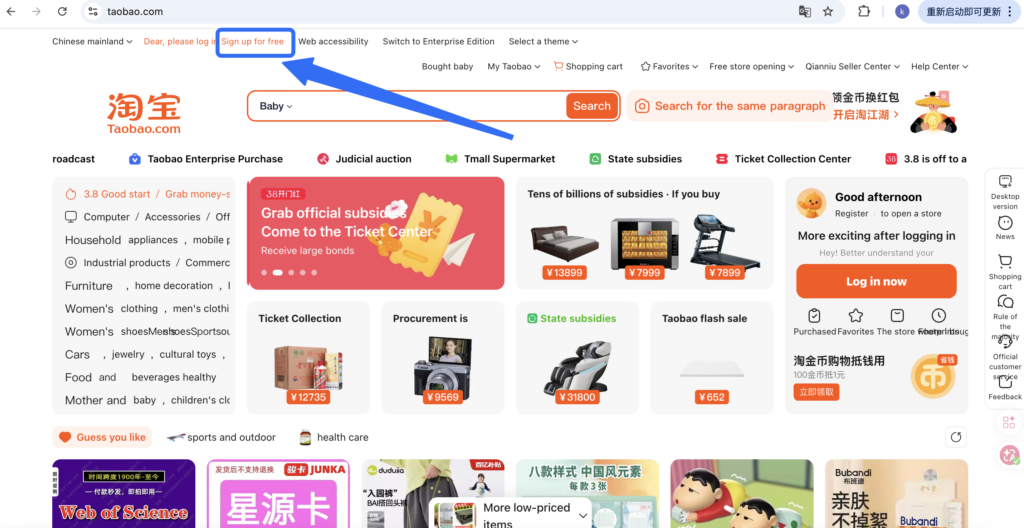
Go to the Taobao homepage and click “Sign up for free”.
Step 3: Enter Your Phone Number
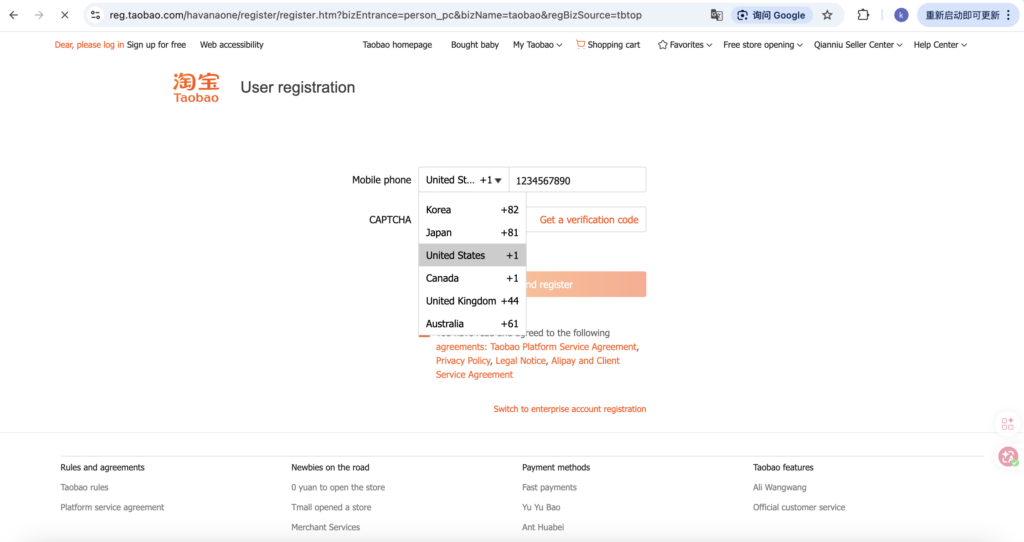
Select your country code, enter your mobile phone number, and complete SMS verification.
Step 4: Set Your Password
Set your login password and submit the form to complete your registration.
Method 2: Using the Taobao App
- Step 1: Download the Taobao app from the App Store or Google Play. Open the app and tap “Register”.
- Step 2: Select your country code, enter your mobile number, and request the SMS verification code. Input the 6-digit code sent to your phone (wait 60 seconds and tap resend if needed).
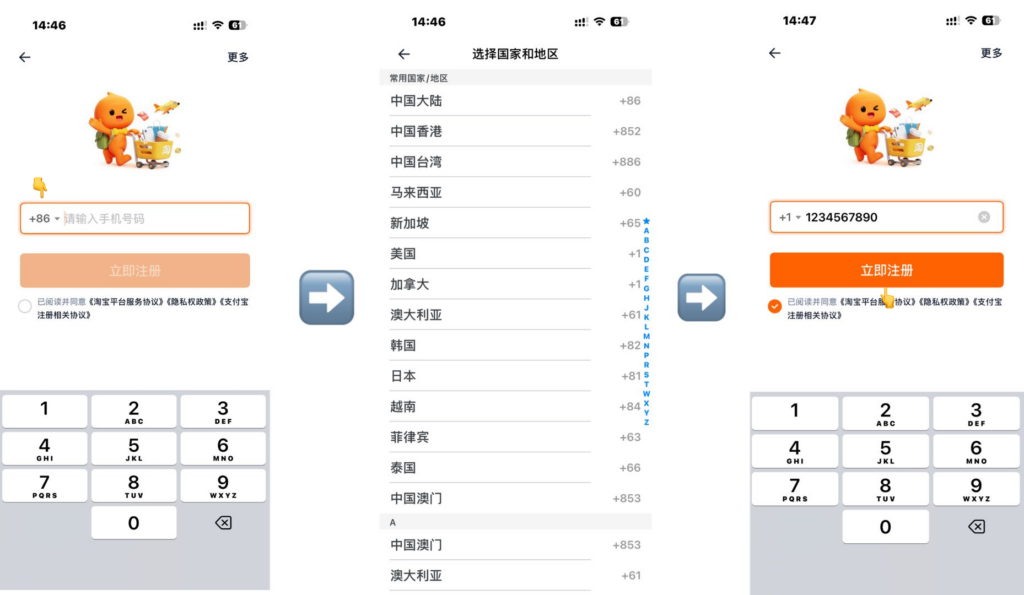
- Step 3: Create a secure password to complete registration, your account will be successfully activated.
Note that the Taobao app does not have an official English version and the interface is fully in Chinese. This method may be more challenging for non-Chinese speakers, but is still a viable option if you prefer using a mobile app.
Easier Alternative for Overseas Buyers to Shop on Taobao
Creating a Taobao account is just the first step. Many overseas buyers still face challenges even after registering:
- Chinese-only interface with no official English version
- Difficulty linking Alipay for payments
- Sellers not offering international shipping
- Complex logistics and customs procedures
- Language barriers when communicating with sellers
A Taobao shopping agent can handle all of these challenges on your behalf. Shopping agents purchase items directly from Taobao, manage Chinese payments, consolidate multiple parcels, perform quality checks, and ship internationally — all with English customer support.
Mulebuy is one such agent that many overseas buyers rely on for a smoother and more convenient Taobao experience. Whether you’re a first-time buyer who hasn’t set up Alipay yet, or a bulk buyer looking for a more streamlined process, Mulebuy saves time and reduces risk.
Conclusion
Following the steps above, you should now know how to make a Taobao account. Once you’ve successfully registered through the app or website, you can start exploring Taobao’s products.
Whether you choose to shop directly or through a shopping agent, having a Taobao account is the first step toward enjoying a seamless shopping experience on China’s largest e-commerce platform. We wish you an enjoyable shopping experience.
FAQs
Yes, you can create a Taobao account without a Chinese phone number. Taobao allows international users to register using phone numbers from many countries. All you need is a valid mobile number that can receive SMS messages, as Taobao will send a verification code during the registration process.
Taobao does not have a fully official English version. However, you can use browser translation tools, such as Google Translate, to navigate the platform and understand product listings. You can refer to this article for detailed information on how to change Taobao to English.
It could be due to several reasons: carrier restrictions, an incorrect country code, network delays, or temporary issues with your mobile provider. Make sure your phone can receive international SMS messages and that you entered the correct country code.
If the problem persists, try waiting a few minutes and requesting the code again, or consider switching to the Taobao mobile app for registration, which sometimes has faster verification delivery.