



If you’ve ever tried to shop on Chinese platforms like Taobao or Xianyu, you’ve likely run into one common requirement: Alipay. In the past, people outside China had many difficulties, but now it’s much easier for international users to get started.
This guide will show you exactly how to sign up for an Alipay account from abroad, verify your identity, and link your payment methods. Ready to shop without a payment barrier? Let’s get you verified.
What You Need Before Signing Up for an Alipay Account
Before creating your Alipay account, prepare the following:
- A valid mobile phone number (international numbers are accepted)
- An international email address (not a must)
- A passport (required for identity verification)
- A smartphone (recommended for app setup and verification)
- A bank card (optional but useful for payments)
Tip: Without completing identity verification, your account will have limited functionality.
How to Sign Up for an Alipay Account (Step-by-Step)
Signing up for Alipay doesn’t have to be a headache. We’ve mapped out the entire process for you, from initial registration to final verification, making your international setup faster and easier than ever.
Step 1: Download the Alipay App
Download Alipay from the App Store or Google Play, and make sure you install the international version, which defaults to English and automatically streamlines the interface.

Step 2: Register Alipay with Your Phone Number or Email
When registering for Alipay, you have two options. Via mobile phone is the most efficient route: select your home country code (such as +1 for the USA or +44 for the UK) and enter your mobile number. You will instantly receive an SMS verification code to confirm your identity, which helps streamline your future login and payment processes.
Alternatively, you can choose to sign up using an email address. While this provides a quick entry point into the app, you should know that Alipay is a mobile-centric platform. For enhanced account security and a smoother checkout experience, it is recommended to bind a mobile phone number to your account after registration.
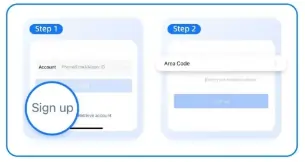
Step 3: Complete Identity Verification in the Alipay app
To unlock full functionality, you must complete real-name verification:
- Go to Account Settings
- Select Identity Information
- Upload your passport details
- Complete facial recognition
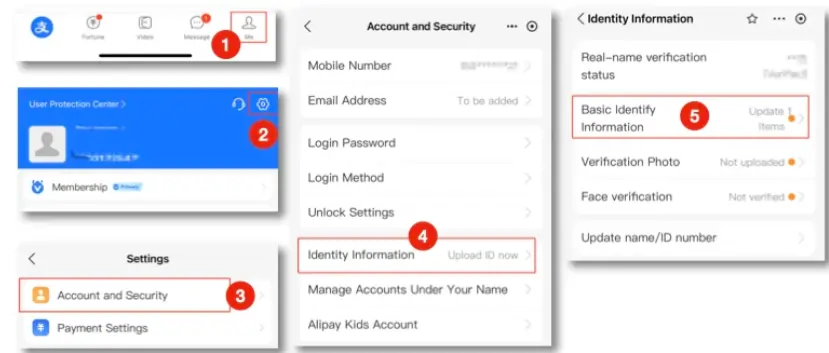
Step 4: Link Your International Card
Alipay now supports most Visa, Mastercard, and JCB cards issued worldwide. You can choose one and add your card:
- Navigate to Bank Cards > Add Card
- Enter your card details
- Ensure your billing address matches your bank records exactly
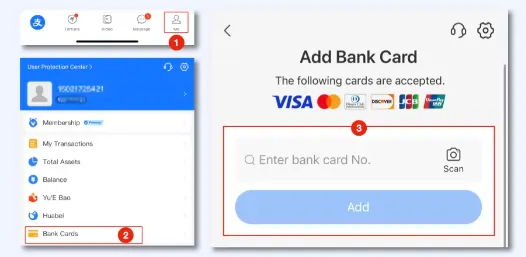
Step 5: Set Your Alipay Password
You’ll be asked to create a 6-digit payment password, which is required for every transaction. Do not lose this, as resetting it outside China can be time-consuming and may require re-verification.
Common Issues When Signing Up for Alipay (and How to Fix Them)
Here are some challenges users outside China often face:
Why is my bank card being rejected?
You receive an error message when trying to link your Visa, Mastercard, or JCB card. This often occurs because not all international card issuers are compatible with Alipay’s current payment gateway, or your bank may have flagged the transaction as suspicious.
You can call your bank to ensure “International Transactions” are enabled. If the problem persists, try linking a different card, specifically one from a major global bank, as these tend to have higher success rates with cross-border verification.
Why was my identity verification rejected?
This is frequently caused by an unclear or mismatched passport image, or information in the form that doesn’t perfectly match the machine-readable zone (MRZ) at the bottom of your passport.
You should retake the photo in a well-lit room with natural light so that all four corners of the passport are visible. Double-check that the name you typed manually matches the spelling on your passport exactly.
Why am I not receiving the SMS verification code?
This often occurs because some mobile carriers automatically block “A2P” (application-to-person) international messages as spam, or your roaming settings are interfering with the signal.
You can check if your phone blocks international texts. If it fails, wait 60 seconds and try the “Voice Verification” option to receive a phone call with your code.
Tips for Using Alipay Outside China
1.Avoid using a VPN during signup
Alipay’s security algorithms may flag your account if your IP address shows you are in one country while your phone number is in another. During the registration and verification phase, please turn off your VPN.
2.Stay Ahead of Expiration Dates
Your Alipay account relies on valid identification. Frequently check that your passport info matches your current document; if you’ve recently renewed your travel papers, you should upload the new details in the app to prevent any sudden payment blocks.

Conclusion
Signing up for an Alipay account outside China is becoming easier now. With a valid phone number, passport, and a few simple steps, you can create and verify your account successfully. If you want to buy something from China or travel in China, give it a try.
Frequently Asked Questions (FAQs)
Yes! You can link your home country’s Visa, Mastercard, or JCB card directly to the Alipay app to start shopping on Taobao or paying at international merchants instantly.
Yes, but it depends on the size of your purchase. When using an international bank card with Alipay, transactions under ¥200 RMB are usually free, but a 3% service fee applies to each transaction above ¥200 RMB.
When using an overseas bank card with Alipay, payments are subject to certain limits. Currently, there is a ¥3,000 RMB per-transaction limit, a ¥50,000 RMB monthly cumulative limit, and a ¥60,000 RMB annual cumulative limit per account.