



Mulebuy points may appear in your account after you ship a parcel, complete a task, or reach an eligible VIP level. However, it may not be immediately clear where these points come from or what you can redeem them for. This guide explains how Mulebuy points work, how to earn and use them, when they expire, and where to check your balance.
What Are Mulebuy Points?
Mulebuy points are rewards earned through eligible shipping activity, account tasks, and VIP benefits. You can currently use them to redeem coupons or products available in the Redeem Store. The rewards and required point amounts depend on what is available in your account at the time.
Eligible points are calculated and added automatically. You do not need to submit a separate claim, although some rewards may take a short time to appear.
Mulebuy Points vs. Growth Value
Besides points, your account may also show Growth Value, which tracks progress toward your VIP level. Both can come from the same eligible shipping payment, but they have different purposes and cannot be used interchangeably.
| Feature | Mulebuy Points | Growth Value |
| Purpose | Redeem eligible rewards | Determine your VIP level |
| Shipping calculation | ¥1 paid shipping = 1 point | ¥1 paid shipping = 1 Growth Value |
| Other sources | Tasks, upgrades, birthday rewards | International shipping payments |
| Validity | Depends on your VIP level | Follows current VIP program rules |
The same eligible shipping payment can add both points and Growth Value. Growth Value moves you toward a higher VIP level, while points increase the balance you can redeem for rewards.
How Do You Earn Mulebuy Points?
You can earn Mulebuy points through international shipping, Task Center activities, VIP upgrades, and eligible birthday benefits.
1. Pay for International Shipping
You normally earn 1 point for every ¥1 of eligible international shipping actually paid after applicable discounts and coupons. Any remaining fraction of ¥1 is rounded up.
For example:
| Calculation | Amount |
| Original shipping fee | ¥300.00 |
| After a 1% VIP discount | ¥297.00 |
| After an additional 15% coupon | ¥252.45 |
| Points after rounding | 253 points |
In this example, the system calculates points from the final paid amount of ¥252.45, which rounds up to 253 points rather than using the original ¥300 shipping fee.
2. Complete Tasks in the Task Center
The Task Center includes one-time new-user tasks, repeatable daily activities, and longer-term shipping tasks. Points are added after you complete the conditions shown for each task.
| Task type | Requirement | Reward |
| New user | Download the app and sign in | 1,000 points |
| New user | Ship your first parcel | 500 points |
| Daily | Browse Trending for 20 seconds | 20 points |
| Daily | Add a product to your cart | 20 points |
| Growth | Ship 3 international parcels in one month | 1,000 points |
| Growth | Ship monthly for 3 consecutive months | 200 points |
You can check the tasks and their completion conditions through Member Center → Task Center. Since activities and reward amounts may change, use the live account page as your current reference. New users can also read our How to Use Mulebuy guide for the full ordering, warehouse, and parcel-submission process.
3. Reach a New VIP Level
Bonus points are automatically credited the first time your account reaches an eligible VIP level. The move from VIP0 to VIP1 does not include an upgrade-point reward.
| New level | Upgrade reward |
| VIP2 | 200 points |
| VIP3 | 300 points |
| VIP4 | 1,000 points |
| VIP5 | 2,000 points |
4. Earn Birthday Month Double Points
VIP3–VIP5 members may receive double points once per year during their birthday month. Add your birthday to your profile before an eligible international parcel reaches shipped status so the system can apply the benefit automatically.
How to Check Your Points Balance
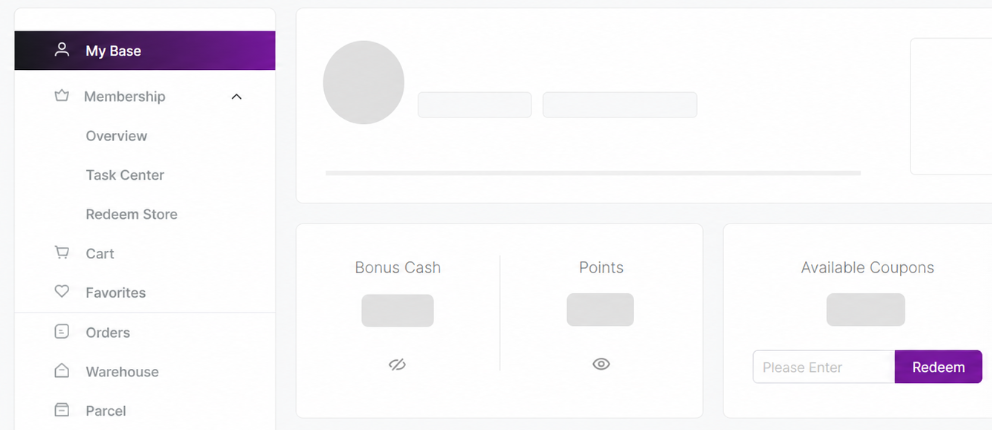
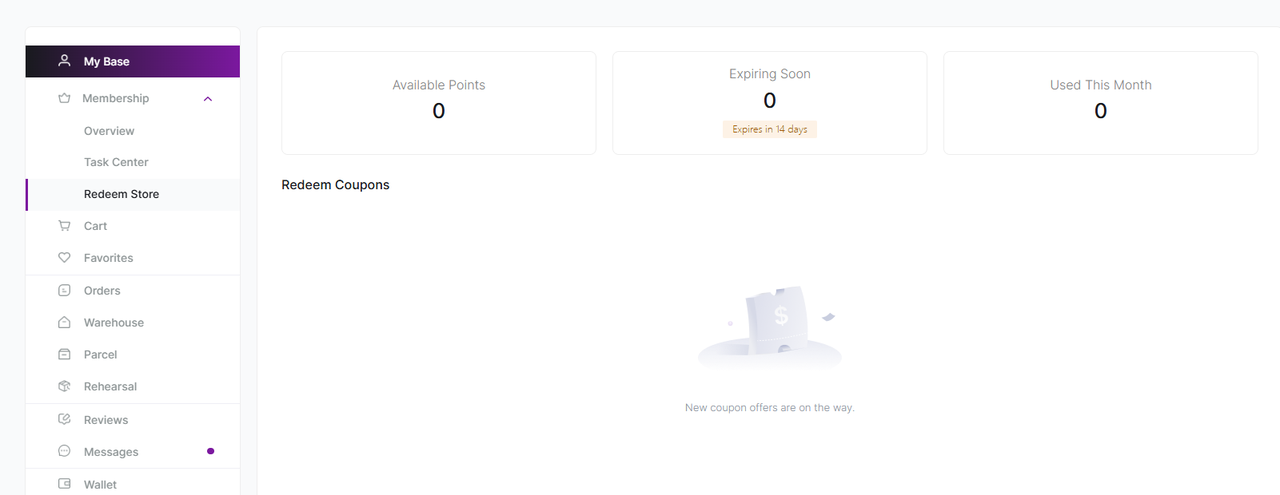
After signing in, open My Base to see your current points balance directly. For a more detailed view, go to Membership → Redeem Store. This page separates your points information into three summary cards:
- Available Points: Your current usable balance.
- Expiring Soon: Points due to expire within the next 14 days.
- Used This Month: Points redeemed during the current month.
Your VIP level also appears beside your profile avatar, allowing you to check your membership status and points from the same account area.
How Can You Use Mulebuy Points?
You can currently use Mulebuy points in two ways: redeem available coupons or exchange them for eligible products in the Redeem Store.
Before redeeming, check the required points, validity period, and usage conditions. A coupon may apply only to a particular fee or require a minimum spend. Products may also have separate availability and fulfillment terms.
Available rewards can change. When the Redeem Coupons section shows “New coupon offers are on the way,” there is no coupon available at that time, but your existing point balance remains in your account.
Do Mulebuy Points Expire?
Yes. Mulebuy points expire for VIP0–VIP3 members, while points held by VIP4–VIP5 members currently have no listed expiration date.
| VIP level | Point validity |
| VIP0–VIP3 | 1 year |
| VIP4–VIP5 | No expiration |
For VIP0–VIP3 accounts, check the Expiring Soon figure regularly so you can use older points before they expire. Membership rules may change, so treat the information shown in your account as the current reference.
How to Get More Value from Your Points
A good redemption is not necessarily the coupon with the largest number displayed. It should match an upcoming parcel and have terms you can realistically meet. Before exchanging your points:
- Redeem points when you expect to submit a parcel soon.
- Choose a coupon that applies to your upcoming parcel.
- Check the minimum spend and usage conditions.
- Confirm the coupon expiry date before exchanging your points.
Point expiry and coupon expiry are separate. Once you exchange points, the coupon you receive may have its own shorter validity period. For more ways to reduce your overall cost, see our Taobao agent money-saving tips before arranging your next parcel.

Final Thoughts
Mulebuy points reward eligible shipping activity, account tasks, and selected VIP benefits. You can use them for available coupons or Points Mall products, while Growth Value separately tracks your VIP progress. Before redeeming, check your usable balance, expiry dates, and reward conditions. Sign in to My Base to review your points before submitting your next parcel.
Frequently Asked Questions
Parcel points are issued after the qualifying international parcel reaches shipped status. Task and promotional points follow the distribution rules shown for the relevant activity. VIP upgrade rewards and other eligible system benefits are calculated automatically.
No. Points are spent on rewards, while Growth Value determines your VIP level. The same shipping payment can contribute to both balances.
The current rules list coupons and Redeem Store products as the available redemption options. They do not state that points can be withdrawn as cash.